Tools Are Easy. Outcomes Are Hard. How We Build an SEO Stack That Moves Numbers
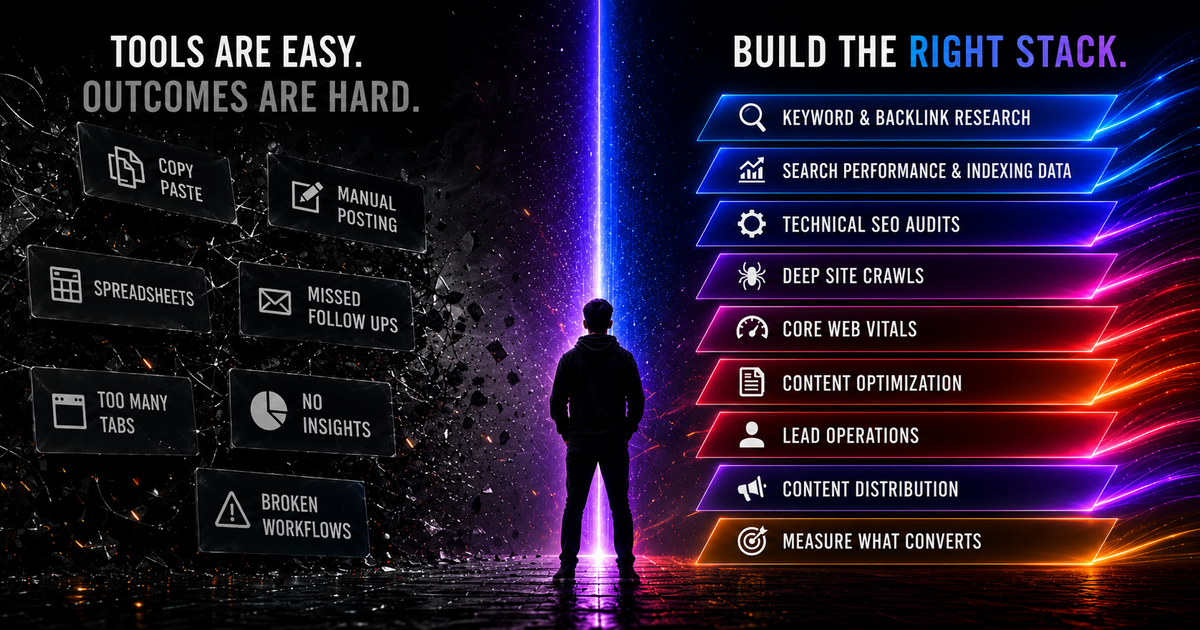
We build software in the SEO and lead-gen space, so we spend a lot of time looking at how people try to grow a website. And the pattern is almost always the same. Somebody buys Ahrefs, installs a WordPress plugin, opens fourteen browser tabs, exports three spreadsheets, and then wonders why the needle isn't moving.
None of those tools is the problem. The problem is that buying them feels like progress, even when nothing connects the research, the site, the leads, and the eventual sale. You end up with copy-paste, manual posting, missed follow-ups, and a graveyard of broken workflows that nobody wired together. Tabs are not a strategy.
Developers already know the difference between installing a library and shipping something reliable with it. We approach SEO the same way: as a system with inputs, dependencies, failure points, and measurable output.
The trap: a shelf of tools is not a pipeline
The size of the software market makes the problem easy to see.
Scott Brinker's martech landscape counted 15,384 tools in 2025, up about 9% year over year and roughly 100x the 150 tools that existed in 2011. So the category isn't just big, it's compounding.
And we barely use what we buy. Gartner's marketing survey found teams using only about 33% of their martech stack's capabilities in 2023, recovering to roughly 49% by 2025. Even after that recovery, teams were still leaving roughly half of their purchased capabilities unused.
We see the far end of this pattern constantly. When we scanned 292 small-business sites, almost all failed a basic mobile performance check. Not for lack of tools. For lack of a system connecting them.
None of that is a tooling shortage. Nobody's problem is "I need a fifteen-thousand-and-first tool." The problem is that the tools don't talk to each other, the workflow between them is manual, and there's no pipeline connecting "I published a thing" to "a customer paid me."
So instead of shopping, build the pipeline. Here's the stack we actually reach for, bottom to top, and what each layer is really doing.
Layer 1: Keyword and backlink research (decide what to build for)
Skipping research is like writing a feature before reading the ticket. The job isn't "find high-volume keywords." It's the intersection of what people search, what you can credibly rank for, and what actually makes you money. A 40,000-searches-a-month term you have no authority to win, and that converts nothing, is worse than a boring 90-a-month term a ready-to-buy customer types in.
Backlink research shows who links to the pages already winning those searches, and whether you have a realistic way to earn comparable links. That tells you whether a page is worth the time before you build it.
Output of this layer: a short, ranked list of pages you're going to build or fix, each tied to a real query and a real conversion. That list is your backlog.
Layer 2: Search performance and indexing data (your production telemetry)
If you ship code without logs and metrics, you're flying blind. Same with a website. Google Search Console is the closest thing you get to production telemetry straight from the search engine, and it's free.
Two reports do most of the work:
- Search Performance: Clicks, Impressions, CTR, and average Position, sliceable by query, page, country, and device. Your "what am I actually ranking for, and where" dashboard.
- Page Indexing (the old Coverage report): which URLs are indexed, and for the ones that aren't, why. Reasons like "Crawled - currently not indexed" and "Excluded by noindex tag" are the error log of your site's relationship with Google.
Two limits will bite you if you build on top of it. Performance data is a rolling 16-month window, so export it yourself if you care about year-over-year. And the UI caps exports at 1,000 rows, which is nothing for a real site. Get past the cap with the Search Analytics API (up to 50,000 rows/day per property per search type) or the Bulk Data Export to BigQuery, which isn't row-limited. If you can write a for loop, you can pull your own data at real scale instead of squinting at the dashboard.
Don't eyeball GSC once a month. Pipe it somewhere you can query it.
Layer 3: Technical SEO audits
A technical audit is a linter for your site's crawlability. It isn't one official Google checklist, it's an industry-consensus set of categories, but the categories are stable, and they're the same ones our own DeepAudit AI grades:
- Indexability and directives: robots.txt, meta robots, canonical tags, HTTP status codes
- XML sitemaps: present, valid, submitted, and actually fresh
- Structured data: valid JSON-LD, eligible for rich results
- Mobile and responsive: you're being indexed mobile-first whether you like it or not
- HTTPS and security: TLS, no mixed content
- Site speed and Core Web Vitals: covered below, it's big enough for its own layer
- Internal linking and architecture: crawl depth, orphan pages, sane anchor text
- Rendering: does the rendered page match what you think you shipped
One honest caveat so you don't over-index on the wrong thing: HTTPS is a (minor) ranking signal, but specific security headers like CSP and HSTS are security best practice, not ranking factors. Do them because they're correct, not because you think they'll bump you up a spot.
Layer 4: Deep site crawls and rendered content
Here's the part most developers get wrong, and it matters more every year because we ship more JavaScript.
Google's pipeline is crawl, then render, then index. Every page that returns a 200 gets queued for rendering. Google runs a headless Chromium, executes your JavaScript, and indexes the rendered HTML, not just the raw source that came off the server.
That rendering step sits in a queue. Google's own docs say a page "may stay on this queue for a few seconds, but it can take longer." This is the reality behind the old "two-wave indexing" phrase people used to throw around. Google doesn't frame it as two fixed waves anymore, but the deferred-rendering queue is real and documented.
Two practical consequences:
- Raw HTML and rendered DOM can differ, and the difference is what gets indexed. If your content only exists after a client-side fetch, Google has to render to see it, and rendering is deferred. Server-render or statically generate the content that matters.
- Do not put `noindex` in the raw HTML of a page you want indexed and plan to "fix with JavaScript later." If Google sees
noindexin the initial response, it can skip rendering entirely and never run your JS. You can't un-noindex a page client-side. We've watched this silently nuke real pages.
A deep crawl (Screaming Frog, Sitebulb, or your own script) is how you catch orphan pages, redirect chains, canonical conflicts, and raw-versus-rendered gaps before Google does.
Layer 5: Core Web Vitals
Core Web Vitals is the part of SEO that feels most like ordinary performance engineering. There are three, all measured at the 75th percentile of real user page loads:
| Metric | Measures | "Good" threshold |
|---|---|---|
| LCP (Largest Contentful Paint) | Loading | ≤ 2.5 s |
| INP (Interaction to Next Paint) | Responsiveness | ≤ 200 ms |
| CLS (Cumulative Layout Shift) | Visual stability | ≤ 0.1 |
Note the middle one. INP replaced FID (First Input Delay) as a Core Web Vital on March 12, 2024. FID only measured the delay of the first interaction. INP measures the latency of all interactions on the page, which is a much harder and more honest bar. If your mental model still says "FID," update it.
Why bother past the ranking nudge? Because speed is a conversion feature independent of Google. Google and Deloitte's "Milliseconds Make Millions" study (2020, 30M+ sessions) found that a 0.1-second improvement in mobile load time lifted retail conversions by 8.4% and average order value by 9.2%. An improvement of that size would justify engineering time in almost any product backlog. On a website, part of it may be sitting in an oversized bundle or a slow rendering path.
You can measure it without guessing:
# Field data from the Chrome UX Report via PageSpeed Insights API
curl "https://www.googleapis.com/pagespeedonline/v5/runPagespeed?url=https://example.com&category=performance&strategy=mobile"
Lab tools (Lighthouse) tell you what could be slow. Field data (CrUX, the loadingExperience block in that response) tells you what real users actually feel. Optimize against the field data.
Layer 6: Structured data and content
Once the page is fast and crawlable, make it legible, to both readers and parsers. On the machine side, that means structured data.
JSON-LD is Google's recommended format for structured data: a script block that describes the entities on your page using schema.org vocabulary. It's decoupled from your markup, so it's easy to maintain and hard to accidentally break with a CSS change.
<script type="application/ld+json">
{
  "@context": "https://schema.org",
  "@type": "LocalBusiness",
  "name": "Example Co",
  "address": {
    "@type": "PostalAddress",
    "streetAddress": "123 Main St",
    "addressLocality": "Denver",
    "addressRegion": "CO",
    "postalCode": "80202"
  },
  "telephone": "+1-555-0100",
  "openingHoursSpecification": [{
    "@type": "OpeningHoursSpecification",
    "dayOfWeek": ["Monday","Tuesday","Wednesday","Thursday","Friday"],
    "opens": "09:00",
    "closes": "17:00"
  }]
}
</script>
Match the schema to the content. Use a specific LocalBusiness subtype (Restaurant, HealthClub, and so on) for a physical business, Organization when there's no storefront, and Article / BlogPosting for content like this post. Valid structured data makes you eligible for rich results (review stars, FAQs, breadcrumbs, local packs). It's widely believed to help AI answer engines cite you too, and that's plausible, but we'll be straight with you: Google doesn't document it as a guaranteed mechanism, and structured data never guarantees a rich result even when it's valid. Do it because it's cheap and correct, not because it's magic.
And it isn't only Googlebot reading this anymore. AI answer engines and LLM-backed search pull from the same clean, server-rendered content and structured markup you'd build for a rich result. The work didn't change; the audience for it did. A page that's easy for a crawler to parse is easy for a model to quote. It does not require a separate "AI SEO" project. It requires the same clear content, rendered HTML, entity information, and technical accessibility the site should already have.
Layer 7: Lead handling
This is the layer people bolt on last and it's the one that actually touches revenue. Traffic has little value when a submitted lead sits unnoticed for hours. At that point, the site is recording demand rather than converting it.
The numbers on this are brutal and old enough to be settled. From the Harvard Business Review study "The Short Life of Online Sales Leads" (2011, audit of 2,241 US companies):
- Firms that made contact within an hour were nearly 7x more likely to qualify a lead than those who waited just one more hour, and more than 60x more likely than those who waited a full day.
- The average first-response time across those companies was 42 hours.
- 23% never responded at all.
Earlier MIT / InsideSales research (2007, vendor-commissioned, so grain of salt) put even sharper numbers on the first few minutes, with contact odds dropping up to 100x between a 5-minute and a 30-minute response. The exact figure is arguable; the direction isn't.
A new lead starts losing value almost immediately. The response does not need to be complicated, but it does need to be fast: acknowledge the request, qualify it, route it, and put it in front of the right person. It's the exact problem our Axion Deep Labs product Site2CRM automates: capture the lead, qualify it, and route it to a human the second it lands.
Layer 8: Distribution
Publishing is not distribution. A post can be live, indexed, and technically perfect while reaching almost nobody beyond the people who already visit the site.
The maxim we keep coming back to, popularized by Derek Halpern, is to spend 20% of your time creating content and 80% distributing it. It's a rule of thumb from one practitioner, not a study, and plenty of people argue it's closer to 50/50. The point survives the quibbling: most people pour everything into creation and nothing into distribution, then blame the content.
Distribution is its own work, so systematize it: syndicate the piece, link it from relevant answers, put it in front of people who'd actually use it. And rewrite it per destination, because LinkedIn isn't X and a dev community isn't Facebook. That per-platform rewrite is the exact job our Axion Deep Labs product Made4Founders was built to do. (One gotcha for anyone cross-posting: set rel="canonical" on the syndicated copy back to the original on your own domain, so you get the ranking credit instead of splitting it between two URLs.)
Layer 9: Revenue attribution
Every layer above is theater if you can't answer one question: which of this produced revenue?
Rankings are a proxy. Traffic is a proxy. Even leads are a proxy. Trace the path from query to landing page, from landing page to lead, and from lead to booked revenue. That is how you learn which page paid for itself and what belongs in the next backlog.
It's also the layer that kills tool sprawl on its own. Once you can see what converts, the 33% of your stack that touches nothing measurable becomes obvious, and easy to cut.
The point
You can assemble every tool in this article in an afternoon with a credit card. That does not give you a working system. The value comes from how information moves between the tools, what gets automated, and whether revenue feeds back into the next decision.
So stop shopping for the missing tool. You don't have a tool problem. Build the pipeline instead. Drawn out, the whole thing is one loop:
   Research (Ahrefs)
        |
        v
   Backlog  <-----------------------------+
   (ranked pages, each tied to a query)    |
        |                                  |
        v                                  |
   Build & write the page                  |
        |                                  |
        v                                  |
   Technical audit + deep crawl            |
   (DeepAudit AI, Screaming Frog)          |
        |                                  |
        v                                  |
   Core Web Vitals pass                    |
   (PageSpeed Insights / CrUX)             |
        |                                  |
        v                                  |
   Publish                                 |
        |                                  |
        v                                  |
   Distribute (Made4Founders)              |
        |                                  |
        v                                  |
   Measure what converts (GA4)             |
        |                                  |
        v                                  |
   Lead ops, fast response (Site2CRM)      |
        |                                  |
        v                                  |
   Revenue --------------------------------+
   (which query and page paid off feeds the next backlog)
Every arrow is a place the work flows or leaks. The tools just sit on the boxes; the value is in the arrows.
That's the stack. The tools are just the parts. The system is the job.
Want to see where your own pipeline leaks first? Start at the audit layer. Run the free audit on your site. It loads your pages in Chromium and inspects the rendered result, it's free, and there's no signup, so the report's yours to keep. If you'd rather read it together, book a free 15-minute teardown and we'll walk through what it found, no pitch.
Related services
Keep reading
- The 100/100 SEO ChallengeRun your site through DeepAudit AI, fix what it finds, and see if you can get all nine categories green. Then decide whether the tool was right.
- State of Small Business Websites 2026: A Developer's View of the Data292 sites scanned, 191 valid mobile tests, 185 failed a Lighthouse threshold. Median mobile LCP: 10.5 seconds. Open dataset, honest denominators.
- Image Optimization for the Web: The Checklist, Minus the PromisesFormats, sizes, srcset, lazy loading, and CLS. What image optimization actually fixes, and why preloading the wrong resource makes things worse.

Written by
Joshua R. GutierrezFounder & Lead Engineer, Axion Deep Digital
SEO strategist and full-stack engineer who builds the audit tooling, then does the work. Technical SEO, Core Web Vitals, and content systems for SaaS and B2B.
View Joshua R. Gutierrez’s full profile & credentials →Ready to build a website that performs?
Let us audit your current site, identify the biggest opportunities, and build a plan to grow your traffic and leads.