The 100/100 SEO Challenge
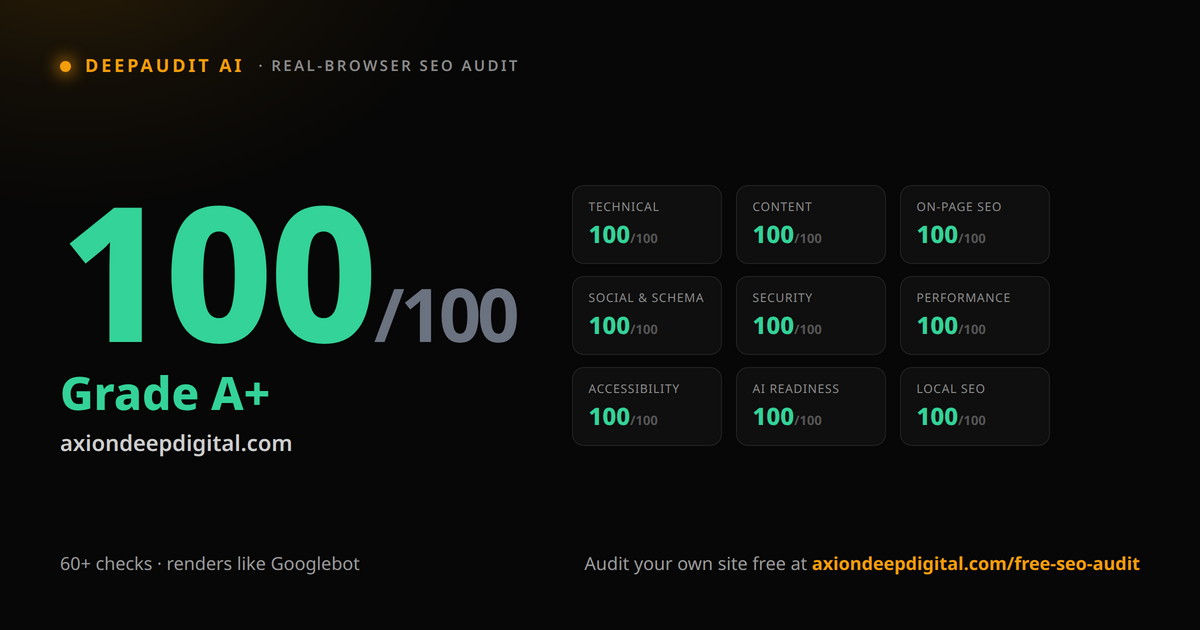
Here is the challenge
Run your website through DeepAudit, fix what it finds, deploy the changes, and scan it again. Keep going until every category is green, or until you can clearly explain why a remaining warning should not be changed.
The second outcome counts too.
DeepAudit renders the page in Chromium rather than judging only the initial HTML. Google also renders with headless Chromium, so this catches JavaScript-dependent problems that raw-HTML checkers miss, though it is not a reproduction of Google's full crawling and indexing system. It grades the site from 0 to 100 across nine categories: Technical, Content, On-Page SEO, Social & Schema, Security, Performance, Accessibility, AI Readiness, and Local SEO.
The public scan is free and does not require an account or a credit card. Most sites we scan come back with several categories in warning or failure territory on the first run. Getting all nine green is hard on purpose.
What a score of 100 actually means
A perfect DeepAudit score does not mean your SEO is finished. It means the pages included in that run passed the checks currently represented in the scoring model. It does not measure whether the content deserves to rank, whether the business has enough authority, or whether visitors become customers.
A site can score 100 and still say very little.
The reverse matters too. A failed check is not an instruction. It is something to investigate. The right response may be to fix the page, to accept a deliberate tradeoff, or to find that the scanner misunderstood what it saw.
One hundred is not the outcome. It means nothing in the current ruleset failed on the pages that were tested.
Start with one page, then test the site
- Run the homepage. Scan it at axiondeepdigital.com/free-seo-audit and save the starting score. It is the fast way in.
- Read before you change anything. Every issue comes with a plain-language explanation. Review each one on its merits. Do not alter working code just to satisfy a generic rule.
- Fix, deploy, rescan.
- Then run the deep scan. A clean homepage does not tell you whether a service page has the wrong canonical, an article is missing from the internal-link structure, a biography has no main heading, or a lead form breaks after JavaScript loads. The deep scan samples up to 50 pages from your sitemap and internal links. Use it before calling the site clean.
- Verify outside the score. Check Search Console, field performance data, structured-data validators, analytics, and the important pages by hand.
The audit begins the investigation. It does not conclude it.
What usually takes the most work
The early points are the easy ones. The last fifteen are where it bites.
Mobile performance is often the hardest category to clear. DeepAudit's Lighthouse run exposes heavy images, excessive JavaScript, blocked fonts, layout movement, and third-party scripts. That is a controlled lab test. Compare it with field data in PageSpeed Insights or Search Console before you decide what real visitors are experiencing, because lab and field results can differ significantly.
Metadata is usually easier to repair. Titles become repetitive, vague, or too long to display usefully. Descriptions go missing or fail to distinguish one page from another. Those are presentation and relevance problems, not simply character-count violations. Google builds title links from several sources and may rewrite yours anyway.
Headings need context. The real question is whether the page has a clear main topic and a logical structure that people, particularly those using assistive technology, can navigate. A vague main heading, headings chosen for their visual size, or skipped levels all make that harder. Multiple H1 elements should be reviewed in context rather than treated as an automatic failure.
Indexability is where small configuration mistakes become expensive. An accidental noindex, a canonical pointing at the wrong URL, blocked resources, or an important page with no crawlable links pointing to it can keep useful content out of the index or cause Google to select a version you did not intend.
Thin and JavaScript-dependent content. Some pages do not answer the query, add original information, or give a visitor a reason to choose the business. That is not a word-count problem, it is a question of whether the page does a distinct and useful job. Other pages contain good material that appears only after JavaScript runs. Google generally renders JavaScript, but rendering is a separate, deferred stage, and some non-rendering crawlers will only ever see the initial HTML.
You will not clear all of that in one sitting. Fix what is real, document what is deliberate, and keep moving.
We found problems in our own scanner
Before we put this challenge in front of anyone, we ran DeepAudit against axiondeepdigital.com. The site now scores 100 out of 100, A-plus, with all nine categories green and a 97 mobile PageSpeed score. You do not have to take our word for it. Run our domain through the same tool and watch the result come back live.
Getting there was not only about fixing our site. Two of the blockers were false positives inside DeepAudit itself.
The first involved the inline styles Next.js injects into optimized images. Those styles are part of how the framework works, and no developer can simply strip them from every image. The tool was counting them against image-heavy sites when it should not have.
The second was a crawler timing issue. The scanner waited for complete network silence, which never arrives on sites where analytics, widgets, or background requests keep firing. Healthy pages were being flagged as failures.
We traced both failures back to the scanner, corrected the rules, added regression tests, and ran the audit again. Only then did we publish the score.
Testing your own product against your own website is a dangerous loop if the goal is only to make the number turn green. The defensible version is to document why a rule was wrong and test the correction against sites other than your own. A scanner is not right merely because it produced a polished report. The tool is part of the review. It is not the reviewer.
Why this challenge matters
Most owners judge their site by how it looks to them. It loads fast on their laptop, the writing reads well, the design is clean, so the foundation must be sound.
The audit adds the views you do not get from opening your own homepage: rendered markup, mobile lab performance, structured data, accessibility checks, security headers, and crawlability signals. That view is usually less flattering, and far more useful.
Join the challenge
Run your homepage. Save the first score. Fix what the evidence supports, then run the deep scan and check the important pages by hand.
When every category turns green, post the result and tag Axion Deep Digital. More importantly, show what you changed to get there. A perfect score is interesting. The work behind it is useful.
If you get stuck, the report will show which checks are still failing. Then decide whether each one is a real defect, an acceptable tradeoff, or something the scanner misunderstood.
Join the 100/100 SEO Challenge: axiondeepdigital.com/free-seo-audit
Related services
Keep reading
- Tools Are Easy. Outcomes Are Hard. How We Build an SEO Stack That Moves NumbersBuying SEO tools is easy. Wiring them into a system that produces rankings, traffic, and revenue is the hard part. Here's our stack, layer by layer.
- DeepAudit AI Is Now on Zapier. Automate Your SEO Audits.DeepAudit AI, our free SEO audit tool, is now available on Zapier (beta). Trigger an audit on any URL and pipe the score and prioritized fixes into 6,000+
- How Much Does SEO Cost in 2026? Our Real NumbersSEO starts at $450 a month with us, and project work is $100 an hour. Here is the arithmetic under any SEO price, and the returns we refuse to promise.

Written by
Joshua R. GutierrezFounder & Lead Engineer, Axion Deep Digital
SEO strategist and full-stack engineer who builds the audit tooling, then does the work. Technical SEO, Core Web Vitals, and content systems for SaaS and B2B.
View Joshua R. Gutierrez’s full profile & credentials →Ready to build a website that performs?
Let us audit your current site, identify the biggest opportunities, and build a plan to grow your traffic and leads.