An Ahrefs Health Score of 100 Can Still Mean 66 Open Issues
An Ahrefs Health Score of 100 looks like a finished job. On one site, the score rose from 64 to 100 after 101 errors were reduced to zero across 199 internal pages. Yet the same crawl still reported 66 open issues. That apparent contradiction reveals what the score actually measures, what it leaves out, and why a site audit should be treated as a diagnostic tool rather than a checklist.
The score went from 64 to 100
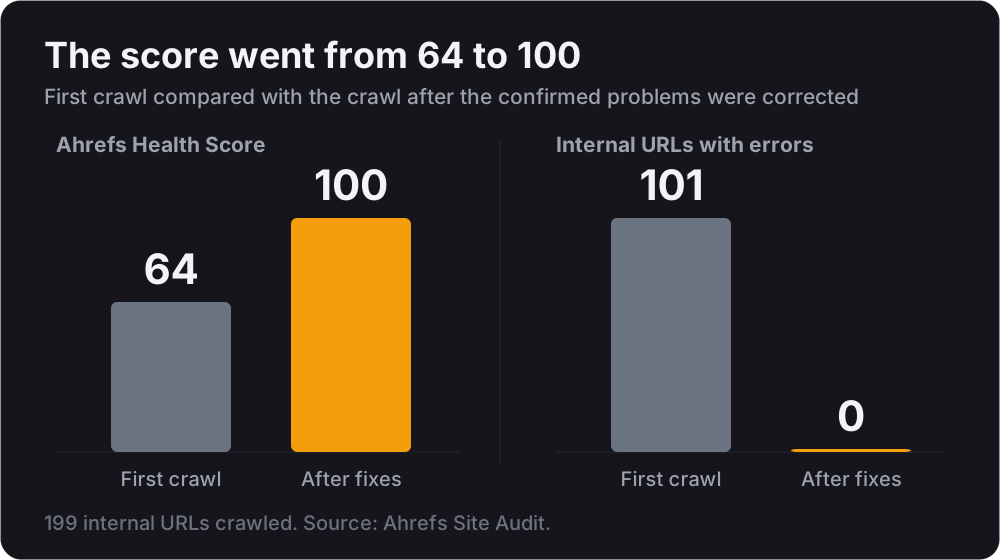
In the first crawl, 101 of the site’s 199 internal URLs contained at least one error. After the confirmed problems were corrected, the next crawl returned zero internal URLs with errors and raised the Health Score by 36 points, from 64 to 100.
| Measure | First crawl | After fixes | Change |
|---|---|---|---|
| Ahrefs Health Score | 64 | 100 | +36 |
| Internal URLs with at least one error | 101 | 0 | 101 fewer |
| Internal URLs crawled | 199 | 199 | no change |
The improvement was real, but the score alone made the result appear more complete than it was. The same report still contained seven warnings and 59 notices. Those 66 open issues did not prevent the site from receiving a perfect Health Score because Ahrefs does not include them in that calculation.
What an Ahrefs Health Score of 100 actually means
Ahrefs calculates its Health Score using the percentage of crawled internal URLs that contain no errors. If every internal URL passes without an error, the site receives a score of 100. Warnings and notices may still appear in the report, but they do not lower the score. A score of 100 therefore means that one crawler found no errors on the internal pages it reached during that crawl. It does not mean the site is finished, ranks well, attracts traffic, converts visitors, or appears in AI-generated recommendations. It is a useful measure of technical condition, but it is not a complete measure of website performance.
A perfect score can still have 66 open issues
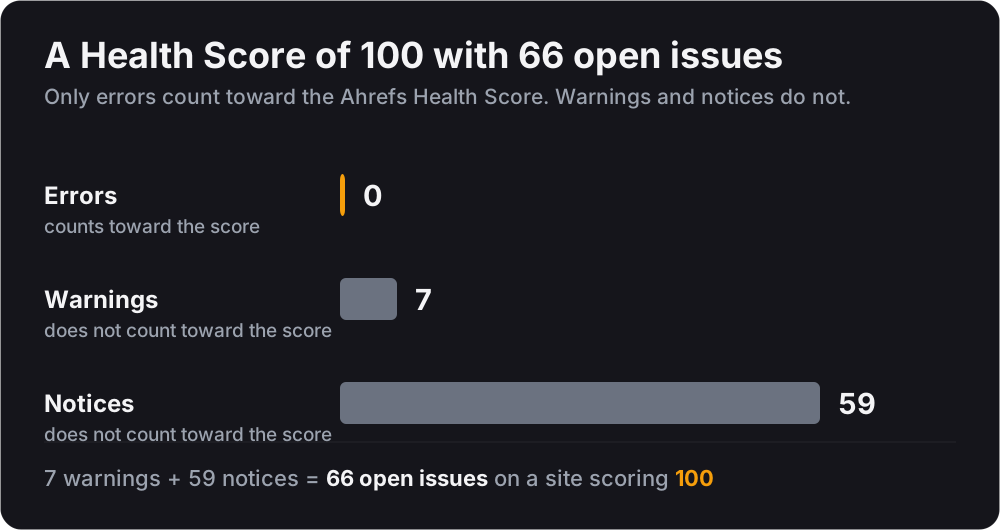
The completed crawl displayed a Health Score of 100 alongside seven warnings and 59 notices. Six pages still had structured data that did not pass Google’s rich-results validation. All of these findings appeared in the same report, but none counted against the score because Ahrefs classified them below the error level.
| Finding type | Count | Counts toward the Health Score |
|---|---|---|
| Errors | 0 | Yes |
| Warnings | 7 | No |
| Notices | 59 | No |
| Total open issues | 66 |
That does not mean every warning or notice represents a problem that must be fixed. Some findings reflect recommendations, crawler limitations, or conditions that require further testing. However, it does mean that the score should never be read without the issue list beside it. The 100 shows that the crawler found no errors. The remaining 66 items show that there was still work to evaluate.
The three problems hiding behind 101 errors
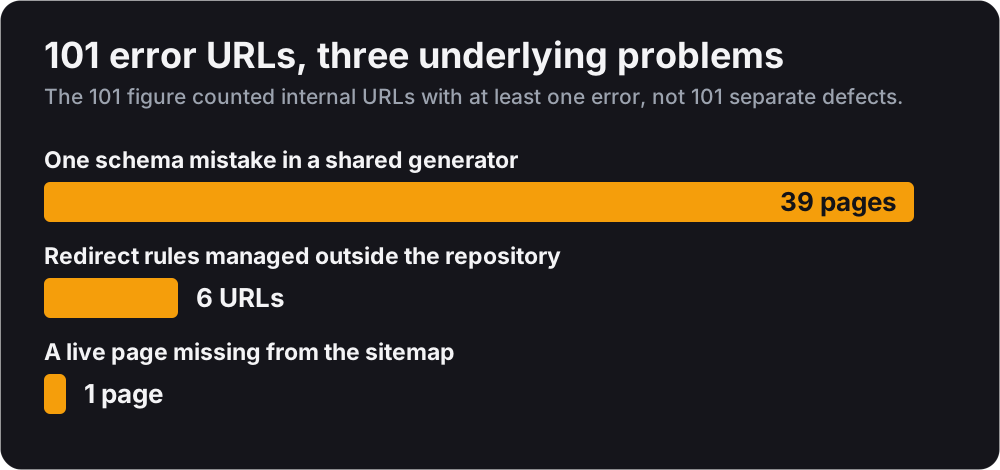
The 101 figure represented internal URLs with at least one error, not 101 unrelated defects. Much of the report could be traced back to three underlying problems:
- One schema mistake repeated across 39 pages. The pages applied
addressRegionandaddressCountryto a City object, even though those properties belong to PostalAddress. Because the same schema generator served every location page, one mistake was reproduced 39 times. - Six URLs had been broken for two months. Four cross-posted articles and two retired case studies returned 404 errors. Their redirects were managed through the hosting console rather than the repository, allowing the live rules and the saved configuration to drift apart.
- One live page was missing from the sitemap. A Spanish-language case study returned a successful 200 response when visited directly, but it was absent from the translated-path map. As a result, it never appeared in the sitemap and had no matching hreflang reference.
One schema mistake repeated across 39 pages
The site applied addressRegion and addressCountry to a City object, even though those properties belong to PostalAddress. The correct way to describe the geographic relationship was through containedInPlace, which the site was already using elsewhere in its structured data. Because the same schema generator served every location page, one incorrect implementation produced validation errors across 39 pages. Correcting the shared generator fixed all of them at once.
| Structured data property | What the site did | What is correct |
|---|---|---|
addressRegion | Applied to a City object | Belongs on PostalAddress |
addressCountry | Applied to a City object | Belongs on PostalAddress |
containedInPlace | Already used elsewhere in the site’s structured data | The correct way to describe the geographic relationship |
| Pages affected | 39 | All repaired by correcting one shared generator |
Redirect rules that drifted outside the repository
Four cross-posted articles and two retired case studies had returned 404 errors for two months because their redirects were managed through the hosting console rather than the normal deployment process. The repository contained four rules that had never been applied, while the live console contained three working rules missing from the repository. Replacing the live configuration with the saved version would have repaired the six broken URLs but deleted three valid rules, including one used to serve images.
| Where the rules lived | Rules present | Status |
|---|---|---|
| Repository | 4 | Never applied to the live site |
| Hosting console | 3 | Working, but missing from the repository |
| Affected URLs | 6 | Returning 404 for two months |
If part of a site’s behavior lives outside its repository, it is invisible to code review, invisible to deployment, and free to drift quietly out of sync.
A live page missing from its own sitemap
One Spanish-language case study was live and working, but missing from the translated-path map.
What visitors saw
Anyone with the direct link could open the page normally. It returned a successful 200 response and appeared to work like any other page on the site.
What search engines saw
The page was absent from the XML sitemap and had no matching hreflang reference connecting it to the English version. The page existed, but the site was not properly telling search engines where to find it or how it related to the rest of the content.
| Signal | Status |
|---|---|
| Direct visit to the URL | 200 response, page loads normally |
| Present in the translated-path map | No |
| Listed in the XML sitemap | No |
| hreflang reference to the English version | No |
Publishing a page and making it discoverable are two separate jobs. The first can succeed while the second fails silently.
Audit tools report clues, not conclusions
During an earlier crawl of the same site, Ahrefs reported five broken images and two broken scripts. Each of the site’s 41 images and 32 scripts was then tested directly, and every file returned a successful 200 response. Reports of multiple H1 elements and duplicate title tags could not be reproduced either. This does not make the audit useless, but it does show why every finding should be treated as a lead to investigate rather than proof of a defect. Confirm the problem on the live site before changing anything.
| What the crawler reported | What was tested | What was found |
|---|---|---|
| 5 broken images | All 41 images on the site | Every file returned 200 |
| 2 broken scripts | All 32 scripts on the site | Every file returned 200 |
| Multiple H1 elements | The live pages | Could not be reproduced |
| Duplicate title tags | The live pages | Could not be reproduced |
Check the website visitors receive, not just the source code
Reviewing the project files is not enough because templates, build tools, and scripts can change what is ultimately published. After the schema correction, all 391 JSON-LD blocks in the compiled website were parsed to confirm that none still contained the invalid Place properties. Searching the original source files could have missed generated markup and produced a clean result while the live output remained wrong. The final website, not the code used to create it, is what visitors, search engines, and AI crawlers actually receive.
Fix the generator, not every affected page
The 39 affected location pages did not need 39 separate edits. They were all produced by the same schema generator, so correcting three shared values in one file repaired every page at once. When the same defect appears repeatedly, the first question should be what those pages share. Editing each output individually may clear the current report, but fixing the generator removes the underlying cause and prevents the same problem from returning on the next page created.
Sixteen issues disappeared and the score did not move
After the schema correction was published, a new crawl confirmed the result:
| Measure | Before | After | Change |
|---|---|---|---|
| Health Score | 100 | 100 | no change |
| Schema validation notices | 16 | 0 | 16 fewer |
| Total notices | 75 | 59 | 16 fewer |
| Total open issues | 81 | 66 | 15 fewer |
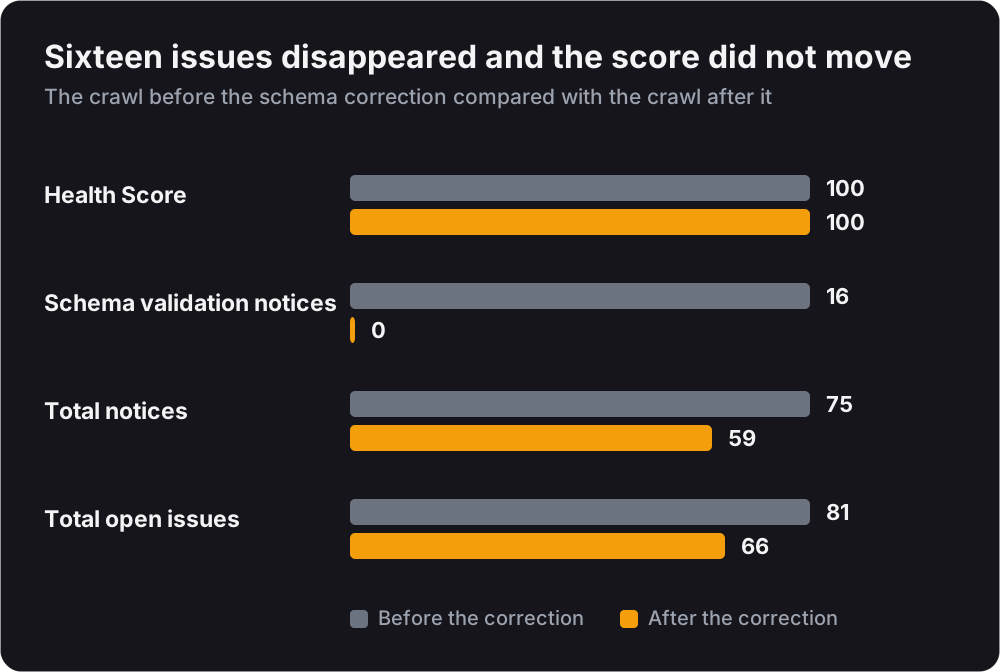
Sixteen confirmed issues disappeared, yet the Health Score remained exactly the same. The total issue count fell by 15 rather than 16 because the new crawl added one unrelated warning. The result demonstrates the limitation of the score using the site’s own data: meaningful technical improvements can be measured, confirmed, and completely invisible to the headline number.
What a score of 100 is actually worth
A Health Score of 100 means that 199 internal pages returned no errors to one crawler during one crawl. That is useful. It confirms that the most severe technical problems have been removed and gives the site a cleaner foundation. It does not prove that the site is finished, visible, competitive, or producing results.
The real value of reaching 100 is not the number itself. It is reaching the point where technical errors can no longer serve as the easy explanation for everything that is not working. From there, attention can move to the harder questions: whether people can find the site, whether the content earns trust, whether search engines understand it, and whether visitors become customers. A perfect audit score is not the finish line. It is where the easy technical excuses end.
Audit your website
If you want to see what a crawler finds on your own website, start with DeepAudit AI. It is free, requires no signup, and runs approximately 100 checks across nine categories, including technical SEO, performance, accessibility, structured data, security, and AI discoverability. It renders the website in a browser, can crawl the sitemap, and provides a report with the affected code so you can see where each finding came from.
Treat its results the same way every audit result should be treated: as a starting point for investigation, not a list to follow blindly. Confirm what is real, fix the underlying cause, and measure the website again after the change.
Related services
Keep reading
- Why a Website Audit Score of 100 Can Reward the Wrong FixA cosmetic fix took our own audit score to 100. The fix that mattered did not. What that exposed in DeepAudit's scoring, and what we changed in the tool.
- Most CPA Firms Don't Need More Schema. They Need a Better-Connected Graph.A pile of valid JSON-LD blocks is not a knowledge graph. For an accounting firm, the work is connecting the firm, its offices, and its people into one story.
- What Structured Data Actually Does (And What It Does Not)Structured data does not generate leads or earn the map pack. It makes your facts machine-readable and can make a page eligible for supported features.

Written by
Joshua R. GutierrezFounder & Lead Engineer, Axion Deep Digital
SEO strategist and full-stack engineer who builds the audit tooling, then does the work. Technical SEO, Core Web Vitals, and content systems for SaaS and B2B.
View Joshua R. Gutierrez’s full profile & credentials →Ready to build a website that performs?
Let us audit your current site, identify the biggest opportunities, and build a plan to grow your traffic and leads.